A policy page is where the actual policy is documented and it corresponds to the lowest level of the structure of the WHO eManual.
The addition of a policy page represents the first step in the process of managing content for the WHO eManual. Only after all approvals have been made is the content visible to end-users and searchable.
1. Open the WHO eManual and sign in.
2. Using the Navigation bar, browse to the section under which the new policy page must be created and select
Create a new Policy page from the
Settings menu.
Note: Do not use the
Add a page option. A page created this way will not be properly configured for the WHO eManual.
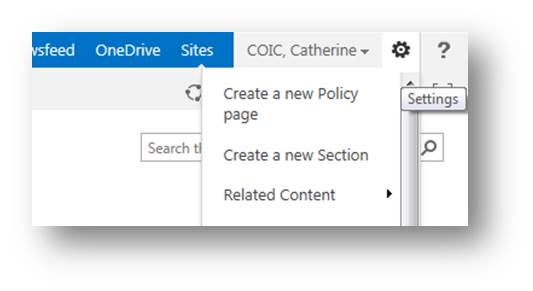
The
Create Page screen is displayed.
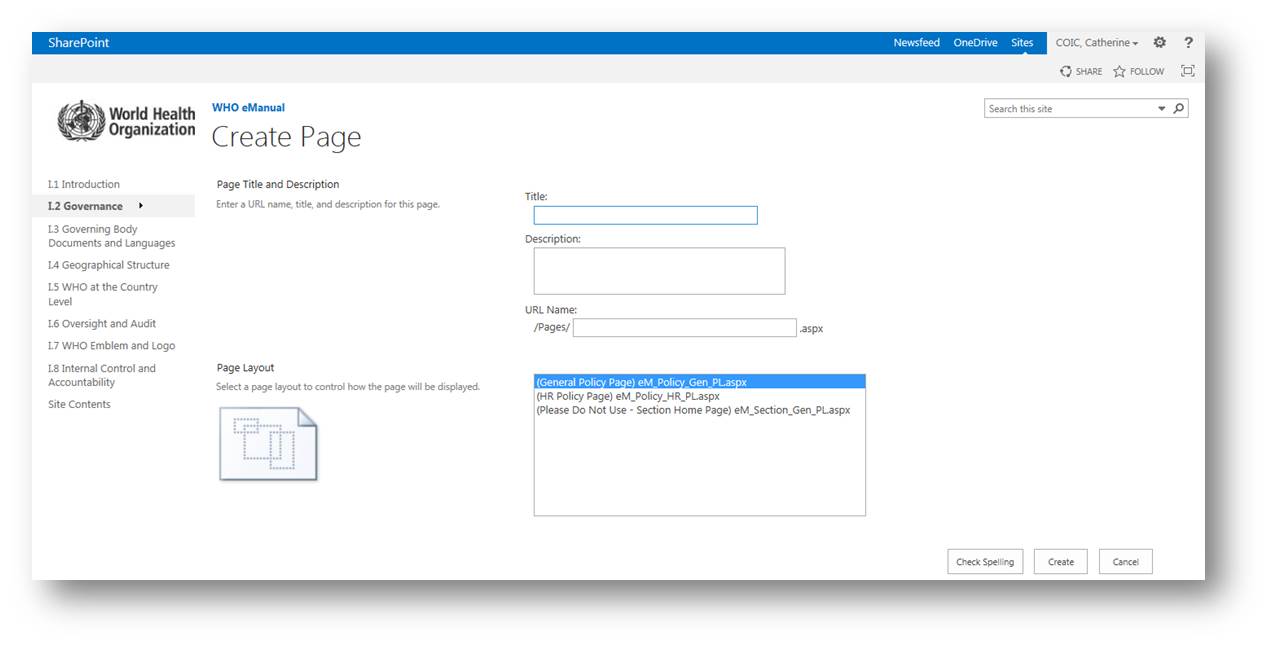
3. In the
Title field, type the name of the policy and press
Enter. The
URL Name field is automatically completed.
4. Modify it as follows:
- type the part, section and page number before the page title and
- remove all spaces or hyphen added by the system
Title: World Health Assembly
URL Name: I22WorldHealthAssembly
5. Select
General Policy Page as the page layout, unless your pages are to be created under "Part III Human Resources" , in which case you should select HR Policy Page.
6. Click
Create.
The new page is created and opens in a new screen.
Note: The new policy page is not visible to end-users and is not searchable at this stage of the process.
To learn how to import and format the text of the policy, go to the section:
Modifying a policy page
To learn how to initiate the approval process, go to the section:
Starting the aproval workflow
Navigation bar | Left-hand side of the window that allows for a quick access to specific parts, sections and policy pages. |
Part | Element of the structure of the WHO eManual, representing its highest level. |
Policy page | Element of the structure of the WHO eManual, representing its lowest level. The policies of the Organization are documented at this level. |
Ribbon | A list of menu options that are accessible to users. The content of the ribbon is contextual and changes depending on what actions are being performed or the user's role. |
Section | Element of the structure of the WHO eManual, representing its intermediate level. |
Settings | A drop-down menu that can be access by clicking the "wheel" icon on the Ribbon. Among other options, allow a contributor to open a policy page in the Edit Mode. on the Ribbon. Among other options, allow a contributor to open a policy page in the Edit Mode. |
URL | Represents the unique address of a specific page on the internet. The URL is used to create a link. |
WIMS account | Account necessary to access some specific functionalities of the WHO eManual. The WIMS account is also used to access other systems such as GSM. |