The structure of the WHO eManual mainly reflects the administrative core functions of the Organization and is therefore relatively stable.
Modifications to the structure of the WHO eManual are nevertheless necessary in some very specific occasions. This is usually to reflect changes to the organization of work of the institution itself. These modifications are as follows:
- Adding a part or a section
- Modifying a part or a section title
- Reorganizing the structure of a part or of a section
As a contributor, you can add a section to a part. Instructions to do so are detailed in the below section:
Adding a section.
Other changes, including adding parts, modifying titles, or reorganizing the structure, are managed centrally because of the potential impact of such changes throughout the entire WHO eManual. Liaise with the team by sending an email to
emanual@who.int.
1. From the
Settings menu, select
Create a new Section.
Note: Make sure you are at the correct part level when initiating this process as this will affect both where the section is created within the structure of the WHO eManual and also the URL of the section being created.
2. Fill in the
Section Title field – remember to prefix the title with the part number and number of the section being created (see example below)
3. Fill in the
URL field – enter "s" followed by the number of the new section's number.
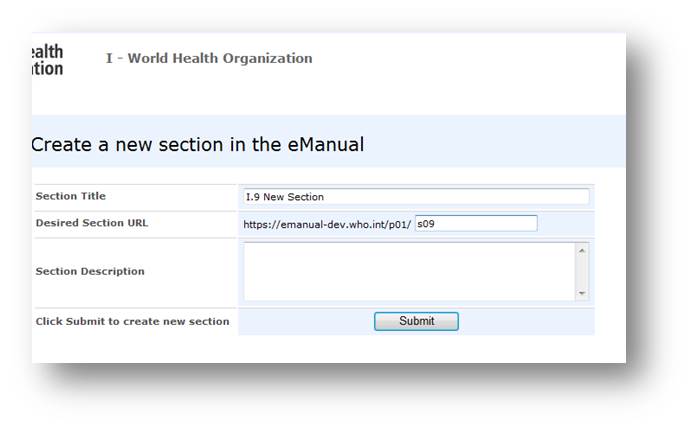
Note: Do not fill in the
Section Description field – the information entered here is not visible to end-users.
4. Click
Submit.
Note: The creation of a new section does not go through an approval workflow.
The new section is added at the bottom of the list of sections within the part and you can start adding policy pages to it.
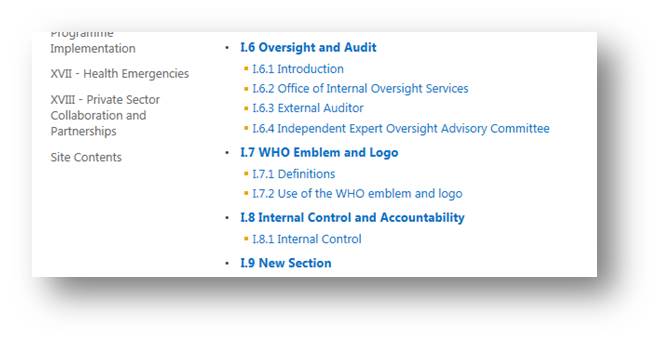
Caution: If you have to add a new section to the middle of the structure of a part, contact the WHO eManual team. Be aware that you will have to renumber all the following sections and policy pages . Also, all links pointing to these sections and policy pages (including those in other parts) must be updated.
To learn how to add a policy page, go to the section:
Adding a policy page
To learn how to import and format the text of the policy, go to the section:
Modifying a policy page
Breadcrumbs | Links at the top of a page that allows a user to go back up in the hierarchy of the document. |
Part | Element of the structure of the WHO eManual, representing its highest level. |
Policy page | Element of the structure of the WHO eManual, representing its lowest level. The policies of the Organization are documented at this level. |
Ribbon | A list of menu options that are accessible to users. The content of the ribbon is contextual and changes depending on what actions are being performed or the user's role. |
Section | Element of the structure of the WHO eManual, representing its intermediate level. |
Settings | A drop-down menu that can be access by clicking the "wheel" icon on the Ribbon. Among other options, allow a contributor to open a policy page in the Edit Mode. on the Ribbon. Among other options, allow a contributor to open a policy page in the Edit Mode. |